Combined contact search/lookup

A suggestion from the September 2023 networking session was to have the ability to find and create customers and contacts more easily. With separate lists in HARMONiQ for Customers, Prospects, Leads, Specifiers, End Users and Suppliers, it can be easy to end up with duplicate data across the system without having a simple way to check for any existing records as you create a contact. While there is a global search function, most users find this disruptive having to perform a search, and then if the contact can't be found, having to rekey this information to actually create the contact.
There is a Micronet developed feature similar to this requirement which allows you to type in basic contact details, and the system will peform a search for any existing contacts or customers matching any of the details entered. You can then select to use one of these customers rather than creating a new one. The functionality this is missing is the ability to also include Prospects and Leads etc in the search, and then auto convert them through to a Customer if required.
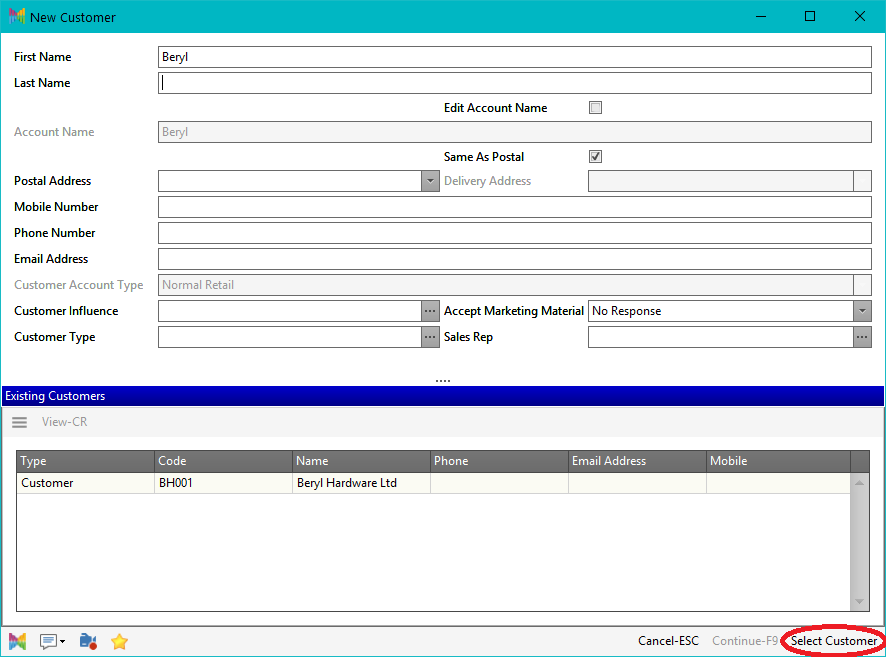
We would intend to include this anywhere in the system where you go to add a new Customer, Prospect, Lead etc, and have it bring up a screen similar to the above screenshot which would show any existing matches as you fill out the details. If no matches are found, it will create the relevant account without you needing to reenter any information.
Feel free to suggest any other ideas on how this could work for you, and whether it's a feature you'd like to use in your system - initial estimate for development of this feature is $9.5k, which we could share between a few customers or build ourselves if there is enough interest.
-

Could this be used for creating Customer Contacts and Delivery Contacts?
Maybe it could be used to solve the question we had around processing Cash Sale Orders without having to enter details twice…?
0 -
Caleb Smith yes this could be built as part of it as well. Would make a lot of sense to do these points at the same time.
0
Please sign in to leave a comment.
Comments
2 comments